The Outbound Referral Analysis dashboard provides CRM users with a detailed breakdown of treatment opportunities that have not been accepted, including comprehensive outbound referral information.
Note: The data refresh process for the BI analytics will occur every 5 hours.
Requirements
The user must have access to Referral Analytics.
Important: For instructions on accessing Kipu BI reporting, please click here.
Accessing BI Report
- Select Analytics > Kipu BI > Outbound Referral Analysis.
Filter Controls
See below for a complete breakdown of the available filters on this dashboard.
- Patient Name: Specify a patient (or patients) for outbound referral reporting examination.
- Referred To: Specify the referral source(s) that received the outbound referral.
- Denial Reasons: Used to restrict the report to only display unaccepted opportunities that were denied for a specific reason(s).
- Proposed Facility: Use this filter to only display unaccepted treatment opportunity records that contain a specific proposed facility.
- Proposed Location: Use this filter to only display unaccepted treatment opportunity records that contain a specific proposed location.
- Opportunity Create Date: Set a specific timeframe for reviewing unaccepted treatment opportunities in outbound referral reporting.
- RS Primary Relationship Manager: Examine outbound referral data based on the specific primary relationship manager(s) tied to the outbound referral sources.
- RS Secondary Relationship Manager: Examine outbound referral data based on the specific secondary relationship manager(s) tied to the outbound referral sources.
- Timezone: Designate a specific timezone for the system or all date/time values presented in the dashboard.
Outbound Referrals Report 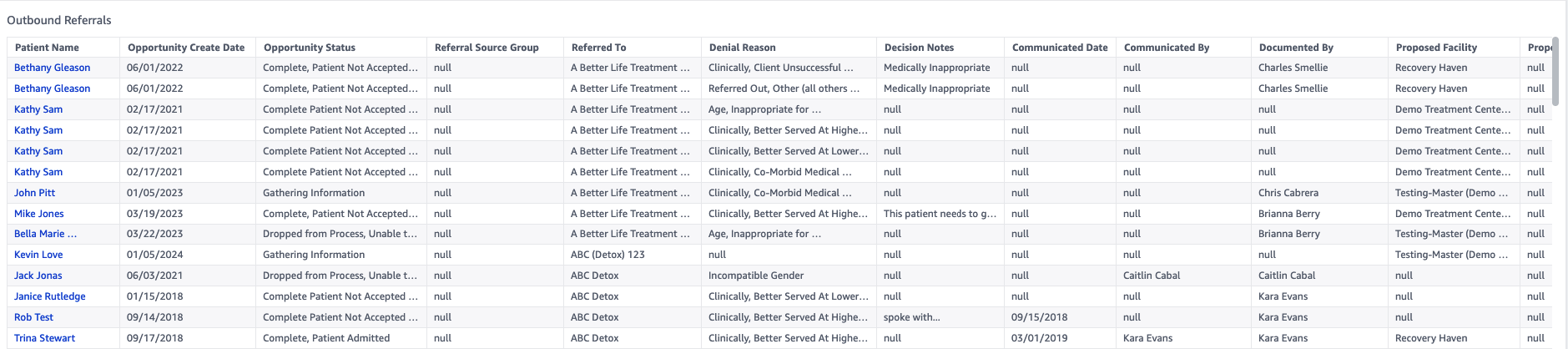
A list of all the available data points can be found below.
- Patient Name
- Opportunity Create Date
- Opportunity Status
- Referral Source Group
- Referred To
- Denial Reason
- Decision Notes
- Communicated Date
- Communicated By
- Documented By
- Proposed Facility
- Proposed Location
- RS Primary Relationship Manager
- RS Secondary Relationship Manager
Referral Details Report 
A complete list of all available data points on the report can be found below.
- Referral Source Group
- Referred To
- Patient Name
- Address Line 1
- Address Line 2
- Address Line 3
- Address Line 4
- City
- State
- Zip
- Country
- Communicated Date
- Communicated By
- Documented By
- Denial Reason
- Decision Notes
- Opportunity Create Date
- Opportunity Status
- Proposed Facility
- Proposed Location
- Care Coordinator
- RS Primary Relationship Manager
- RS Secondary Relationship Manager